Kubernetes CSI driver
Pod-local volumes that archive themselves to S3
Heapdumps, rotated logs and backup dumps land in object storage without a sidecar, an S3 SDK, or a single line of change in your application. The pod writes ordinary files; the driver on the node ships them.
- CSI v1.12.0
- Java 25, GraalVM native
- amd64, arm64
- no RBAC
- no sidecar
volumes:
  - name: dumps
    csi:
      driver: s3archiver.csi.trion.de
      volumeAttributes:
        bucket: prod-dumps
        # omit on AWS: the host is derived from region
        endpoint: https://s3.internal.example.com
        prefix: "heapdumps/{namespace}/{podName}/"
Anything the pod writes to that volume shows up under
s3://prod-dumps/heapdumps/<namespace>/<pod>/… shortly after the writer finishes, and at the
latest when the pod terminates.
The problem#
Getting a file out of a pod and into object storage is a recurring chore, and every usual answer puts storage concerns inside the workload:
- add an S3 SDK and credentials to the application;
- bolt on a sidecar sharing an
emptyDir; - write a
preStopscript that races pod termination and loses.
This driver moves the problem to the node, where it belongs. The application keeps writing files to a directory and never learns that S3 exists.
How it works#
One DaemonSet pod per node, nothing per workload. kubelet creates the volume directory and hands the driver the pod's metadata and secrets over a Unix domain socket; the driver watches the directory and uploads.
kubelet publishes the volume
The driver validates every attribute up front and creates a plain directory under the kubelet target path. A bad value fails the pod with a readable message on its events, rather than a bucket that quietly stays empty.
The pod writes files
Ordinary POSIX writes at local-disk speed. No FUSE layer, no network in the write path, no surprise latency when the object store is slow.
The archiver notices and uploads
A shared inotify watcher plus a periodic rescan detect changes. Once a file has been unmodified for
quiescenceSecondsit is uploaded, streaming single-PUT or multipart, with capped-backoff retry and bounded per-node concurrency.appendOnlyvolumes sync while the file still grows.The final sweep blocks teardown
When the pod terminates the driver uploads everything new or changed one last time, ignoring the quiescence window, and holds up pod deletion until it is done. Set
sweepTimeoutSecondsif you would rather have best-effort teardown.
What you get#
Nothing in the pod
No sidecar, no init container, no S3 SDK, no credentials in the application. The pod declares a volume; the node does the rest.
Quiescence-based upload
A file is uploaded once the writer stops touching it. A shared inotify watcher does the noticing, with a periodic rescan as a safety net.
Append-only log shipping
appendOnlysyncs files that never stop growing, either by re-uploading or, Loki-style, by shipping only the new tail bytes.A final sweep that actually waits
Pod termination blocks until the last file is in the bucket. The heapdump written seconds before the crash is the one you wanted most.
Credentials that stay off the node
Per-volume secrets, driver-global keys, the AWS default chain (IRSA works untouched), or presigned mode, where the node holds nothing.
Predictable keys
Prefix templates with
{namespace},{podName},{date}and friends. A typo fails the pod instead of creating a directory called{namesapce}.Empty RBAC
The driver never calls the API server. kubelet pushes pod metadata and per-volume secrets into the CSI calls, so there is no Role to audit.
Any S3, not just AWS
Endpoint and path-style overrides per volume. Tested against SeaweedFS on every build; the same code path serves Ceph RGW and AWS.
One static binary
A GraalVM native image in a
FROM scratchimage: No shell, no package manager, no libc. Runs unprivileged with a read-only root filesystem.
See it run#
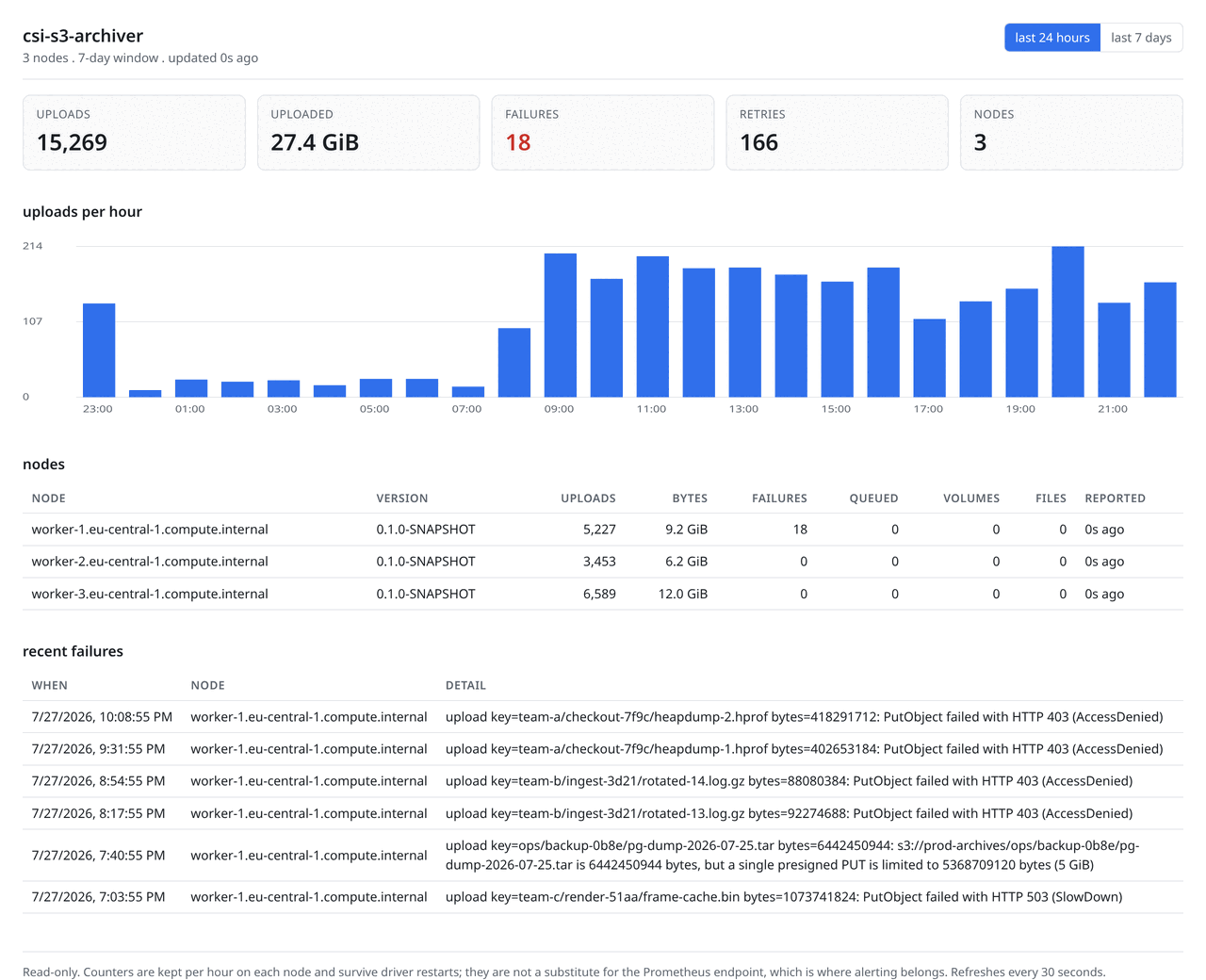
Optional statistics Web UI.
Getting started#
Installing is one kustomize apply. Archiving your first file is a pod spec with six extra lines
in it.
$ kubectl apply -k deploy/base
$ kubectl -n csi-s3-archiver rollout status daemonset/csi-s3-archiver
$ kubectl get csinode -o jsonpath='{.items[*].spec.drivers[*].name}'
s3archiver.csi.trion.deThen a pod that writes a file. Everything under /dumps ends up in the bucket, at the latest when
the pod terminates.
apiVersion: v1
kind: Pod
metadata:
  name: heapdump-example
spec:
  restartPolicy: Never
  containers:
    - name: app
      image: busybox:1.36
      command: ["sh", "-c", "dd if=/dev/urandom of=/dumps/java_pid1.hprof bs=1M count=4; sleep 60"]
      volumeMounts:
        - name: dumps
          mountPath: /dumps
  volumes:
    - name: dumps
      csi:
        driver: s3archiver.csi.trion.de
        volumeAttributes:
          bucket: prod-dumps
          # omit on AWS: the host is derived from region
          endpoint: https://s3.internal.example.com
          prefix: "heapdumps/{namespace}/{podName}/"
Two more shapes#
A log that never goes quiet
A continuously written log never becomes quiescent, so by default it would only be archived at
termination. appendOnly syncs it while it grows, and segments keeps the transfer linear
instead of quadratic.
volumeAttributes:
  bucket: prod-logs
  # omit on AWS: the host is derived from region
  endpoint: https://s3.internal.example.com
  prefix: "logs/{namespace}/{podName}/"
  appendOnly: "true"          # sync while the file is still growing
  appendStrategy: "segments"  # upload only the new tail bytes
  segmentTargetBytes: "1048576"
Bounded node disk
For a CronJob that dumps a database every few minutes, delete the local file once it is safely in the bucket. The node never accumulates.
volumeAttributes:
  bucket: prod-backups
  # omit on AWS: the host is derived from region
  endpoint: https://s3.internal.example.com
  prefix: "pg/{namespace}/{podName}/{date}/"
  deleteAfterUpload: "true"   # bounded node disk: the local file goes after a good upload
Project status#
1.0.0 is released. ghcr.io/trion-development/csi-s3-archiver:1.0.0 is published for
linux/amd64 and linux/arm64, the Helm chart is published beside it as an OCI artifact at
ghcr.io/trion-development/csi-s3-archiver-chart, and both are signed with keyless cosign. The driver is covered by unit,
integration, conformance and end-to-end suites, and comes with no warranty of any kind.
- Working: CSI Identity and Node services over a Unix domain socket, persisted volume state
with recovery across a driver restart and a node reboot, the full configuration and
credential model, streaming and multipart uploads with retry and bounded concurrency, and the
archiver engine: Quiescence,
appendOnly(rewriteandsegments),deleteAfterUpload, glob filters and the blocking final sweep. csi-sanity passes on both the JVM build and the native binary, with and without the optional Controller. - Also working: gzip compression and SSE/SSE-KMS, server-side append so a growing file no longer re-uploads whole, presigned multipart and signer-less POST policies, Prometheus metrics, a statistics web UI, a Helm chart installable straight from the registry, PVC-declared volumes and durable volumes that outlive their pod.
- In progress: mileage on clusters that are not ours. The first release is cut, the images are multi-architecture, and the arm64 binary is exercised by a real kubelet before it ships. What no test suite can supply is other people's workloads.
- Not planned: reading objects back for ephemeral volumes, Windows nodes, capacity enforcement by deletion, and a POSIX filesystem over S3.
Everything documented on this site is behaviour that exists in the code today. The FAQ goes into what is tested, and what that does and does not prove.